
Tag Archives: POS

Ordyx POS Review

Ordyx POS Review

Ordyx POS is a cloud-based point-of-sale system specifically designed to cater to the unique needs of the hospitality industry. Since its inception in 2002, the system has evolved into a robust solution capable of handling the complexities of running restaurants, bars, and nightclubs. Ordyx aims to streamline day-to-day operations by offering a feature-rich platform that enhances efficiency and boosts customer satisfaction. Lets read more about Ordyx POS Review.

The platform’s architecture is entirely cloud-based, meaning it allows businesses to access their data and manage operations from virtually anywhere with an internet connection. This level of flexibility is ideal for restaurant owners who oversee multiple locations or need to monitor performance while on the go. Ordyx caters to businesses of various sizes, from single-location establishments to large franchises, making it a scalable solution.

With the hospitality sector growing increasingly competitive, it is essential to have a dependable POS system that combines multiple operational elements. Ordyx presents itself as a flexible, robust tool designed to tackle widespread challenges like inventory control, order precision, and employee collaboration. As the demand for online ordering and delivery services rises, Ordyx provides integrations that enable restaurants to adjust to evolving consumer preferences. 

Even with its remarkable range of features, Ordyx has its limitations. The user experience, pricing, and customer support of the system have garnered varied responses from users, highlighting the need to analyze both the advantages and disadvantages of this POS system. In this review, we will explore the main features, pricing, user experience, and overall performance of Ordyx POS to offer a fair and thorough assessment. 

Key Features | Ordyx POS Review

One of Ordyx POS’s primary selling points is its comprehensive set of features designed to address the specific needs of hospitality businesses. Each feature is carefully crafted to enhance operational efficiency, improve customer satisfaction, and provide restaurant owners with better control over their business processes.

Online Ordering: The online ordering capability enables restaurants to receive orders straight from their websites or via integrated external platforms. This aspect has grown progressively vital in the current market, where a large share of earnings is derived from takeout and delivery requests. By incorporating online ordering directly into the POS system, Ordyx guarantees that orders are correctly handled and delivered to the kitchen without any manual effort. 

Inventory Management: Ordyx offers real-time inventory tracking, which helps businesses monitor stock levels and reduce waste. The system can automatically deduct ingredients from inventory as items are sold, ensuring that stock levels are always up to date. Additionally, it provides detailed reports on usage patterns, allowing managers to make informed decisions about purchasing and menu adjustments.

Time and Attendance Tracking: Managing staff efficiently is crucial for any hospitality business. Ordyx includes a built-in time and attendance feature that tracks employee working hours, breaks, and overtime. This feature simplifies payroll processing and helps managers ensure that labor costs are kept in check. Additionally, the system can generate labor reports that provide insights into staff performance and scheduling efficiency.

Delivery Management: With the increasing popularity of food delivery, Ordyx’s delivery management feature helps restaurants streamline their delivery operations. The system integrates with mapping tools to optimize delivery routes and track delivery times. It also allows businesses to manage delivery orders separately from dine-in and takeout orders, ensuring a smooth workflow.

Loyalty Programs: Ordyx supports customizable loyalty programs that reward repeat customers. These programs can be tailored to suit different business needs, such as offering discounts, accumulating points, or providing free items after a certain number of purchases. Loyalty programs help businesses build long-term customer relationships and encourage repeat visits.

Remote Authorizations: A distinctive aspect of Ordyx is its ability for remote authorization, enabling managers to approve voids, discounts, or comps from a distance. This functionality is especially beneficial for businesses operating in multiple locations, where a centralized management team supervises different sites. Remote authorization guarantees that approvals are uniform and that managers retain oversight of essential transactions. 

Although these features are certainly advantageous, the degree to which they enhance operations relies on the effectiveness of their implementation and incorporation into a company’s workflow. Ordyx offers extensive customization options, yet some users have indicated that specific features necessitate a learning curve before they can be fully utilized. 

Ordyx POS Review

User Experience and Interface

A POS system’s user interface plays a significant role in determining how easily staff can adapt to using it during daily operations. Ordyx POS has a clean, intuitive design that prioritizes functionality and ease of use. The layout is straightforward, with clear navigation menus and well-organized modules that make it easy for staff to access key features.

One of the standout aspects of Ordyx’s user experience is its support for mobile devices. The system can be accessed via iPads and other tablets, enabling businesses to implement mobile ordering and payment solutions. This is particularly useful for restaurants with outdoor seating or large venues where traditional terminals may not be practical.

However, some users have noted that while the interface is generally user-friendly, there can be a steep learning curve for new staff, especially when it comes to advanced features like inventory management and reporting. Training sessions and documentation are available, but businesses should be prepared to invest time in staff training to ensure smooth adoption.

A crucial element of user experience is the reliability of the system. Ordyx POS functions on a cloud-based system, signifying that it needs a reliable internet connection for best performance. Although the system provides offline features, like saving data locally during outages and syncing after the connection is reestablished, companies in regions with inconsistent internet may face periodic interruptions. 

In general, Ordyx provides a strong user experience through its contemporary interface and versatile accessibility features. Its flexibility with various hardware setups and compatibility with mobile devices render it a versatile option for numerous hospitality enterprises. 

Integration and Compatibility

Seamless integration with other business tools is a critical factor when choosing a POS system. Ordyx POS excels in this area by offering compatibility with various third-party applications and services. This allows businesses to build a cohesive ecosystem that supports all aspects of their operations.

Ordyx integrates with popular accounting software, such as QuickBooks, to simplify financial management. By syncing sales data directly with accounting systems, businesses can reduce manual data entry and ensure that their financial records are always up to date. Additionally, integration with payroll providers streamlines the payroll process by automatically transferring time and attendance data.

Email marketing platforms also facilitate marketing and customer engagement through integrations. Businesses can develop focused marketing strategies utilizing customer information gathered via the POS system. This aids in enhancing customer retention and encourages repeat business. 

Another domain where Ordyx provides flexibility is payment processing. The system accommodates numerous payment processors, enabling companies to select the provider that aligns most effectively with their requirements regarding fees, dependability, and functionalities. Additionally, Ordyx accommodates multiple payment options, such as credit cards, mobile transactions, and gift cards. 

Another advantage of Ordyx is its hardware compatibility. The system is compatible with typical POS equipment like receipt printers, barcode scanners, and cash drawers. It also accommodates mobile hardware, allowing businesses to establish mobile ordering kiosks or portable POS devices. 

Despite its broad integration capabilities, some users have reported occasional issues with third-party integrations, particularly when updates are rolled out. Regular maintenance and prompt support from Ordyx are essential to ensuring that integrations continue to function smoothly.

Pricing Structure

Ordyx POS offers a flexible pricing model that caters to businesses of different sizes and budgets. The pricing structure is designed to be scalable, allowing small businesses to start with a basic plan and upgrade as they grow.

The Lite Plan, priced at $49.99 per month, provides access to core features such as order management, basic reporting, and inventory tracking. This plan is suitable for small establishments with straightforward needs. For businesses requiring more advanced features, the Standard Plan is available at $59.99 per month. This plan includes additional capabilities, such as advanced reporting, multi-location management, and loyalty programs.

Businesses can also choose add-ons based on their specific requirements. These add-ons include online ordering, delivery management, and advanced inventory modules. While this pricing model provides flexibility, it can also result in higher costs for businesses that require multiple add-ons. Therefore, it is important for businesses to carefully assess their needs before selecting a plan.

A benefit of Ordyx’s pricing model is that it does not impose transaction fees. In contrast to certain POS providers that deduct a percentage from every transaction, Ordyx implements a fixed monthly charge, potentially leading to substantial savings for businesses with high transaction volumes. 

Nonetheless, certain users have raised worries about the overall cost of ownership, especially when considering add-on and hardware costs. Moreover, companies might face expenses associated with employee training and continuous assistance. In general, although Ordyx provides competitive rates, companies ought to perform a detailed cost-benefit evaluation to ascertain if it suits their financial plan.

Ordyx POS Review

Customer Support

Ordyx POS provides 24/7 customer support through multiple channels, including email, phone, and live chat. This round-the-clock support is particularly beneficial for businesses that operate during late hours or across multiple time zones. Having access to support at any time ensures that technical issues can be resolved quickly, minimizing disruptions to operations.

In addition to direct support, Ordyx offers a variety of training resources, including live online sessions, in-person training, and webinars. These resources are designed to help businesses get the most out of the system and ensure a smooth onboarding process for new staff. Comprehensive documentation is also available, covering everything from basic operations to advanced features.

Although there are various support channels, user opinions on Ordyx’s customer service vary. Although certain users commend the support team for their quick response and assistance, others mention delays in resolving issues and variations in the quality of help received. This indicates that although Ordyx has worked to offer strong support, there could still be opportunities for enhancement. 

Businesses considering Ordyx should take advantage of the training resources offered and ensure that their staff is well-prepared before going live with the system. Additionally, establishing a clear line of communication with the support team can help address issues more effectively.

Security and Data Management

Security is a critical aspect of any POS system, especially in the hospitality industry where businesses handle sensitive customer information and payment data. Ordyx POS implements multiple layers of security to protect against data breaches and unauthorized access.

The system uses encryption to safeguard data transmitted between devices and the cloud server. This ensures that customer information, payment details, and business data remain secure during transactions. Additionally, Ordyx offers user-level access controls, allowing businesses to define roles and permissions for staff members. This minimizes the risk of internal fraud and ensures that sensitive information is accessible only to authorized personnel.

Regular backups are another important feature of Ordyx’s data management strategy. The system automatically backs up data to the cloud, reducing the risk of data loss due to hardware failure or other unforeseen events. In the event of an internet outage, Ordyx POS can continue operating offline, storing data locally and syncing it once the connection is restored.

Adhering to industry standards is likewise a priority for Ordyx. The system complies with PCI DSS standards, guaranteeing that companies utilizing Ordyx fulfill the essential requirements for secure payment transactions. 

Although Ordyx provides strong security features, it is essential for businesses to adopt best practices, which include frequently updating passwords, educating employees on data security protocols, and making sure that devices operating the POS system are physically secure. 

Scalability and Performance

Scalability is a key consideration for businesses that anticipate growth, whether by expanding to multiple locations or increasing transaction volume. Ordyx POS is designed to support businesses as they scale, offering features and pricing plans that can accommodate growing operational needs.

One of the notable aspects of Ordyx’s scalability is its multi-location management capability. Businesses operating multiple sites can centralize their management tasks, including inventory tracking, sales reporting, and employee scheduling, through a single platform. This simplifies oversight and ensures consistency across locations.

Regarding performance, Ordyx POS is typically lauded for its quickness and dependability. The cloud-based architecture of the system guarantees that data is processed and refreshed instantaneously, which is essential for companies that need real-time precision in order processing and reporting. Moreover, Ordyx’s capacity to function offline guarantees that businesses can keep attending to customers even when there are internet disruptions. 

However, like any cloud-based system, performance can be affected by external factors such as internet speed and server downtime. Businesses should ensure they have a reliable internet connection and consider having a backup connection in place to minimize potential disruptions.

User Feedback Summary

To provide a well-rounded review of Ordyx POS, it is important to consider feedback from actual users. Overall, user reviews highlight the system’s comprehensive feature set, scalability, and flexibility as key strengths. Many users appreciate the ease of accessing the system remotely and the availability of mobile solutions for ordering and payments.

On the negative side, certain users mention difficulties with the initial installation and training. The challenging learning curve for specific advanced functions, like inventory management and reporting, is a frequent issue. Moreover, although the 24/7 assistance is a beneficial feature, varied experiences regarding the responsiveness and quality of support suggest a potential area for enhancement. 

Despite these concerns, most users agree that Ordyx POS offers good value for money, especially for businesses in the hospitality sector that require a robust, feature-rich system.
Ordyx POS Review

Conclusion

Ordyx POS is an all-encompassing, cloud-oriented system created to address the varying demands of the hospitality sector. Its diverse array of features, scalability, and adaptable pricing options render it a suitable option for enterprises of every size, from tiny coffee shops to extensive restaurant chains. Although there are aspects that could be enhanced, like customer service and the learning curve for beginners, the overall advantages of the system surpass its disadvantages. 

Businesses considering Ordyx should carefully evaluate their specific needs and take advantage of the available training resources to ensure a smooth implementation. With the right approach, Ordyx POS can help streamline operations, improve customer satisfaction, and support long-term growth.

Frequently Asked Questions

Q1: Is Ordyx POS suitable for small businesses? 

Yes, Ordyx offers flexible pricing plans and a range of features that cater to small businesses, making it a suitable option for cafes, food trucks, and small restaurants.

Q2: Can Ordyx POS work offline? 

Yes, Ordyx POS has offline capabilities. It stores data locally during an internet outage and syncs it with the cloud once the connection is restored.

Q3: Does Ordyx offer training for new users? 

Yes, Ordyx provides various training resources, including live sessions, webinars, and documentation, to help businesses onboard new staff and make the most of the system.

Vend POS Review

Vend POS Review

Vend POS, now known as Lightspeed Retail (X-Series), is a cloud-based point-of-sale and retail management system designed to streamline operations for inventory-centric retailers. Established in 2010 in Auckland, New Zealand, Vend has evolved into a comprehensive platform that integrates sales, inventory, and customer management functionalities. Lets read more about Vend POS Review.

The system functions smoothly on different devices such as iPads, Macs, and PCs, providing retailers with flexibility. Tasks like processing transactions, managing inventory, and creating detailed reports are made easier by its easy-to-use interface. One important aspect is its ability to function offline, enabling businesses to operate even without internet access, with data synchronizing automatically upon reconnection.

Vend’s inventory management tools are robust, enabling retailers to track stock levels, manage product variants, and set up automatic reordering to prevent stockouts. The platform also supports customer loyalty programs, facilitating the creation of personalized experiences to enhance customer retention.

In 2021, Vend was acquired by Lightspeed, a leading provider of cloud-based commerce solutions. This acquisition expanded Vend’s resources and capabilities, integrating it into Lightspeed’s suite of retail solutions. As part of Lightspeed, Vend continues to offer its core features while benefiting from enhanced support and development resources.

Vend’s pricing structure includes multiple subscription plans to cater to different business sizes and needs. The Lean plan starts at $69 per month when billed annually, offering essential features suitable for smaller retailers. The Standard plan, at $119 per month billed annually, includes advanced reporting and e-commerce integrations. For larger enterprises, the Advanced plan is available at $199 per month billed annually, providing comprehensive features such as loyalty programs and premium API access.

Company Background: History and Evolution of Vend | Vend POS Review

Vend, established in 2010 by New Zealand entrepreneur Vaughan Rowsell, began as a pioneering cloud-based point-of-sale (POS) system aimed at modernizing retail operations. Its inception marked a significant shift from traditional POS systems, offering retailers a more flexible and accessible solution.

In its early years, Vend experienced rapid growth. By 2013, the company secured NZD 8 million in funding from investors in Australia and New Zealand, enabling expansion into international markets. The following year, Vend raised an additional USD 20 million in Series B funding, co-led by Peter Thiel and Square Peg Capital, further accelerating its global reach. This period also saw the opening of offices in Toronto and London, reflecting its commitment to serving a diverse, worldwide clientele.

Vend’s growth was characterized by forming strategic partnerships and improving their products. In the year 2015, Vend Ecommerce was introduced by the company, enabling retailers to smoothly combine online and in-store sales. Partnerships with payment providers such as iZettle and Mercury (now Vantiv) broadened its range of services, increasing the platform’s flexibility. The launch of the inventory management app, Counter (later changed to Scanner by Vend), in 2016, demonstrated Vend’s commitment to meeting the operational requirements of retailers.

A significant milestone in Vend’s journey occurred in March 2021 when it was acquired by Lightspeed POS Inc., a leading provider of cloud-based, omnichannel commerce platforms. The acquisition, valued at approximately USD 350 million, was a strategic move to strengthen Lightspeed’s global retail base and reinforce its position in the Asia-Pacific region. This merger aimed to combine Vend’s innovative retail solutions with Lightspeed’s comprehensive commerce offerings, providing retailers with enhanced tools to manage and grow their businesses.

Post-acquisition, Vend’s integration into Lightspeed’s ecosystem has been pivotal in delivering advanced commerce capabilities to retailers worldwide. The combined expertise and resources have empowered businesses to navigate the evolving retail landscape, offering robust solutions that cater to both online and offline sales channels. This evolution underscores Vend’s commitment to innovation and its role in shaping the future of retail technology.

Vend POS Review

Key Features of Vend POS

Vend POS, now operating as Lightspeed Retail (X-Series), offers a comprehensive suite of features tailored to meet the diverse needs of modern retailers.

Sales and Payment Processing: Vend supports a variety of payment methods, including cash, credit and debit cards, gift cards, and mobile payments like Apple Pay and Google Pay. It integrates seamlessly with numerous third-party payment processors, such as PayPal, Square, and Vantiv, allowing businesses to choose their preferred provider. This flexibility ensures smooth and efficient transactions, enhancing the customer experience.

Inventory Management: The centralized product catalog by Vend makes it easy to manage products, syncing seamlessly across all sales channels. Retailers have the ability to conveniently include, modify, and classify products, including options such as size and color. The system provides strong stock management tools, offering immediate insight into stock levels. Automated reordering helps to keep popular items in stock, avoiding possible sales losses from running out of stock.

Customer Relationship Management (CRM): Vend enables the creation of detailed customer profiles, capturing purchase history and preferences. This data allows retailers to personalize marketing efforts and improve customer service. The platform also supports loyalty programs and promotions, encouraging repeat business and fostering customer loyalty through targeted rewards and discounts.

Reporting and Analytics: Comprehensive sales reports and performance metrics are readily accessible, offering insights into sales trends, product performance, and employee productivity. Vend provides customizable reporting options, allowing businesses to tailor reports to their specific needs, facilitating informed decision-making and strategic planning.

E-commerce Integration: Vend works with commonly used e-commerce platforms such as Shopify and WooCommerce, allowing retailers to effectively oversee both online and offline sales channels. This coordination guarantees uniform inventory levels, pricing, and customer data on all platforms, simplifying operations and offering a cohesive shopping experience for customers.

Employee Management: The system offers user roles and permissions, allowing businesses to control access to sensitive information and functions. Time tracking and performance monitoring features help manage staff schedules and assess individual performance, contributing to efficient workforce management and operational efficiency.

Hardware Compatibility: Vend is compatible with various devices, including iPads, Macs, and PCs, providing flexibility in hardware choices. It supports peripherals such as barcode scanners, receipt printers, and cash drawers, ensuring a complete and efficient point-of-sale setup tailored to specific business requirements.

Pricing Plans

Vend POS, now operating as Lightspeed Retail (X-Series), offers a range of pricing plans designed to accommodate various business sizes and needs. The primary plans include Lean, Standard, Advanced, and Enterprise, each providing a distinct set of features to support retail operations effectively.

Lean Plan: The Lean plan is tailored for small retailers seeking essential POS functionalities. It includes real-time inventory management, secure cloud backup, and support for unlimited products and users. This plan is priced at $69 per month when billed annually. It’s ideal for businesses with a single location and a monthly turnover up to $20,000.

Standard Plan: Targeting expanding companies, the Standard plan includes everything from the Lean plan, plus more features like advanced reporting and analytics, accounting integrations, and e-commerce channel support. It additionally provides support for various locations and allows for unlimited turnover. You can get the Standard plan for $119 per month if you choose to pay annually.

Advanced Plan: The Advanced plan is designed for larger retailers requiring comprehensive tools. It includes all features of the Standard plan, plus loyalty program functionalities, advanced reporting and analytics, and serialization for product tracking. This plan is priced at $199 per month when billed annually. It’s suitable for businesses with complex operations and multiple outlets.

Enterprise Plan: For large-scale retailers with specialized needs, the Enterprise plan offers all features of the Advanced plan, along with customized onboarding, premium API access, and a dedicated account manager. Pricing for this plan is customized based on specific business requirements and is available upon request.

Cost Analysis and Value Proposition: Vend offers a tiered pricing system that enables businesses to choose a plan that suits their operational requirements and budget. The Lean plan offers small retailers an affordable option with necessary features at a fair price. As companies grow, transitioning to the Standard or Advanced packages provides access to advanced features that can improve productivity and facilitate expansion. The Enterprise package provides a customized option for big retailers, guaranteeing they get the essential help and resources to oversee intricate tasks.

User Experience

Vend POS, now operating as Lightspeed Retail (X-Series), is renowned for its user-friendly interface, comprehensive onboarding resources, and responsive customer support, all of which contribute to a positive user experience.

Interface Design and Usability

The platform features an intuitive and clean interface, designed to facilitate ease of use for retailers. Its layout is straightforward, allowing users to navigate through sales, inventory, and customer management functions with minimal effort. The system’s design emphasizes efficiency, enabling quick access to essential features, which is particularly beneficial in fast-paced retail environments. The interface is consistent across various devices, including iPads, Macs, and PCs, ensuring a seamless experience regardless of the hardware used.

Onboarding Process and Training Resources

Vend provides a organized onboarding procedure to help new users in efficiently configuring and using the system. This consists of guided platform tours, help with uploading product SKUs, and setting up settings, taxes, and payment types. Vend offers businesses extended onboarding services for additional support, including thorough training on system usage and data integrity checks. Furthermore, Vend provides a strong support center with an extensive knowledge base, containing in-depth articles and tutorials covering different features of the POS system. These tools are intended to enable users to make full use of the platform’s features and handle common questions on their own.

Customer Support Availability and Responsiveness

Vend is committed to providing exceptional customer support, with a team available 24/7 to assist users via phone, live chat, and email. This round-the-clock availability ensures that retailers can receive timely assistance, regardless of their operating hours or time zone. The support team is known for its responsiveness and dedication to resolving issues promptly, contributing to minimal downtime and sustained business operations. For enterprise-level clients, Vend offers customized onboarding and dedicated account management, providing personalized support tailored to the specific needs of larger retailers.

Vend POS Review

Pros and Cons

Vend POS, now operating as Lightspeed Retail (X-Series), offers a range of features designed to enhance retail operations. However, like any system, it has its advantages and potential drawbacks.

Advantages of Using Vend POS

User-Friendly Interface: Vend POS is known for its intuitive and clean design, making it easy for users to navigate and perform tasks efficiently.

Comprehensive Inventory Management: The platform provides robust tools for tracking stock levels, managing product variants, and automating reordering processes, which helps prevent stockouts and overstocking.

Flexible Payment Processing: Vend supports various payment methods, including cash, credit and debit cards, and mobile payments like Apple Pay and Google Pay. It also integrates with multiple third-party payment processors, allowing businesses to choose their preferred provider.

E-commerce Integration: The system seamlessly integrates with popular e-commerce platforms such as Shopify and WooCommerce, enabling retailers to manage online and offline sales channels cohesively.

Customer Relationship Management (CRM): Vend allows the creation of detailed customer profiles, capturing purchase history and preferences. This data facilitates personalized marketing efforts and supports loyalty programs to encourage repeat business.

Scalability: With various pricing plans, Vend caters to businesses of different sizes, offering features that can scale as the business grows.

Potential Drawbacks and Limitations

Pricing: Some users find Vend’s pricing to be on the higher side, especially for small businesses or startups. The cost may increase with the addition of advanced features or multiple locations.

Limited Advanced Features: While Vend offers comprehensive tools for standard retail operations, it may lack some advanced features required by specific industries or larger enterprises, such as intricate inventory management or specialized reporting capabilities.

Hardware Compatibility: Vend is compatible with iPads, Macs, and PCs but does not support Android devices. This limitation could be a drawback for businesses that prefer or already use Android hardware.

Dependence on Internet Connectivity: Although Vend offers offline capabilities, some features may be limited without an internet connection. Consistent connectivity is essential to fully utilize all functionalities.

Comparative Analysis

Vend POS, now operating as Lightspeed Retail (X-Series), is a prominent point-of-sale system in the retail sector. To understand its position in the market, it’s essential to compare it with other leading POS systems like Square, Shopify, and Lightspeed.

Comparison with Other POS Systems

Square POS: Square is renowned for its simplicity and affordability, making it a popular choice among small businesses and startups. It offers a free POS software option with essential features and charges per transaction fees. However, Square’s functionalities may be limited for larger retailers requiring advanced inventory management and reporting capabilities.

Shopify POS: Shopify is highly skilled at integrating e-commerce, offering a smooth experience for businesses that operate in both online and offline environments. The POS system is especially advantageous for retailers who have a substantial online presence. Nevertheless, some users have pointed out that Shopify’s capabilities for in-store retail are not as strong as its online features.

Lightspeed POS: As Vend POS is now part of the Lightspeed family, it’s pertinent to compare it with Lightspeed’s original offerings. Lightspeed POS is known for its comprehensive features tailored for various industries, including retail and hospitality. It offers advanced inventory management, analytics, and multi-store capabilities. Vend POS complements this by providing a user-friendly interface and flexibility, particularly appealing to small to medium-sized retailers.

Unique Selling Points and Differentiators

Flexible Payment Processing: Unlike some POS systems that require the use of their in-house payment processors, Vend allows integration with multiple third-party payment providers. This flexibility enables businesses to choose processors that best suit their needs and potentially negotiate better transaction rates.

User-Friendly Interface: Vend is praised for its intuitive and clean design, facilitating ease of use for staff and reducing the learning curve during onboarding. This simplicity is advantageous for businesses seeking a straightforward POS solution without sacrificing functionality.

Offline Capability: Vend POS provides strong offline capabilities, enabling retailers to process sales without needing an internet connection. After connection is reestablished, the system will sync data automatically, guaranteeing smooth operations without any loss of data.

Comprehensive Inventory Management: Vend POS provides advanced inventory management features, including real-time tracking, automated reordering, and the ability to manage multiple product variants. These capabilities are particularly beneficial for retailers with extensive and diverse product lines.

Security and Compliance

Ensuring robust security and compliance is crucial for any point-of-sale system, and Vend POS, now operating as Lightspeed Retail (X-Series), is designed with these priorities in mind.

Data Protection Measures

Vend POS employs several strategies to safeguard sensitive information:

Encryption: All data transmitted through the system is encrypted, ensuring that customer payment details and business information are protected during transactions.

Secure Cloud Backup: The platform offers secure cloud backup, allowing businesses to store their data safely and access it as needed.

Access Controls: Vend POS provides customizable user roles and permissions, enabling businesses to control access to sensitive information and critical functions within the system.

Regular Updates: The system is regularly updated to address potential vulnerabilities and enhance security features, keeping the platform resilient against emerging threats.

Compliance with Industry Standards and Regulations

Vend POS adheres to key industry standards to ensure compliance:

Payment Card Industry Data Security Standard (PCI DSS): Vend POS does not directly hold, handle, or transfer any cardholder information. Instead, it depends on third-party service providers that are PCI-compliant to manage transactions, guaranteeing that payment processing meets strict security standards.

Data Privacy Regulations: While specific compliance may vary by region, Vend POS is designed to align with general data protection principles, helping businesses meet their obligations under various data privacy laws.

By implementing these data protection measures and adhering to industry standards, Vend POS provides a secure and compliant environment for retailers to manage their operations and process transactions confidently.

Vend POS Review

Conclusion

Vend POS, now known as Lightspeed Retail (X-Series), provides strong capabilities such as inventory management, flexible payment options, and CRM tools, catering to retail companies of all sizes. Its easy-to-use interface and robust security measures are noteworthy. Ideal for retailers looking to grow their business and improve productivity, this adaptable solution is perfect for addressing today’s retail obstacles.

Frequently Asked Questions

What types of businesses are best suited for Vend POS?

Vend POS is ideal for small to medium-sized retail businesses, including boutiques, apparel stores, homeware shops, and specialty retailers. Its comprehensive inventory management and customer relationship features cater to retailers seeking efficient point-of-sale solutions.

Does Vend POS support offline transactions?

Yes, Vend POS offers offline capabilities, allowing businesses to process sales even without an internet connection. Transactions are securely stored and automatically synced once connectivity is restored, ensuring uninterrupted operations.

How does Vend POS handle multi-store management?

Vend POS offers strong multi-store management capabilities, allowing retailers to monitor inventory, sales, and customer information at various locations through one platform. This centralized method helps with smooth stock transfers, stable pricing, and cohesive reporting, making operations easier for businesses with numerous locations.

Bindo Review

Bindo Review

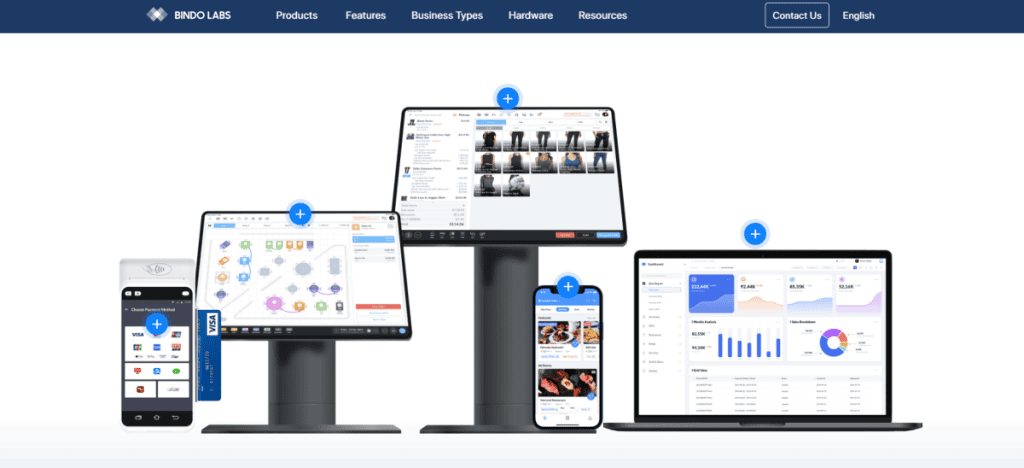
Bindo POS is an all-comprehensive cloud-hosted POS system specifically created to simplify operations for retail and restaurant establishments. Its standout features include a wide range of functions like strong inventory management, CRM integration, and flexible payment processing options. This system is well-known for its flexibility, as it caters to both in-store and online sales with a user-friendly iPad interface. Bindo’s goal is to streamline business operations and improve customer experiences through the seamless integration of multiple business functions on one platform. Let’s delve deeper into the Bindo Review.

Company Background | Bindo Review

In 2010, Jason Ngan, JoMing Au, and Brad Lauster established Bindo with the goal of creating a system that connects traditional retail stores with online shopping. Bindo was first introduced in Manhattan and rapidly became popular due to its unique strategy for local trade, allowing small businesses to challenge bigger retailers through a hyperlocal marketplace. This platform links nearby shops with customers, enabling quick deliveries and improving shopping by managing inventory in real-time.

Over the years, Bindo has expanded its operations globally, with headquarters in New York and additional offices in Hong Kong, Mainland China, and partnerships across Southeast Asia. The company has continuously evolved, integrating advanced features such as NFC payments, EMV chip support, and a robust API for custom integrations. Despite its growth, Bindo remains committed to empowering small and medium-sized enterprises by providing tools that enhance operational efficiency and customer engagement.

Bindo Review

Features and Functionality

Bindo POS provides a wide range of features aimed at improving both business operations and customer experiences. Here is a summary of its main features in different areas.

Payment Processing

Bindo POS effortlessly connects with various payment processors, enabling businesses to take advantage of various payment methods such as credit and debit cards, as well as mobile payments through Apple Pay and Google Pay. This flexibility ensures that businesses can cater to diverse customer preferences. Security is a top priority, with military-grade encryption protecting all transactions. Additionally, Bindo supports EMV chip and contactless NFC payments, providing both security and convenience.

Inventory and Order Management

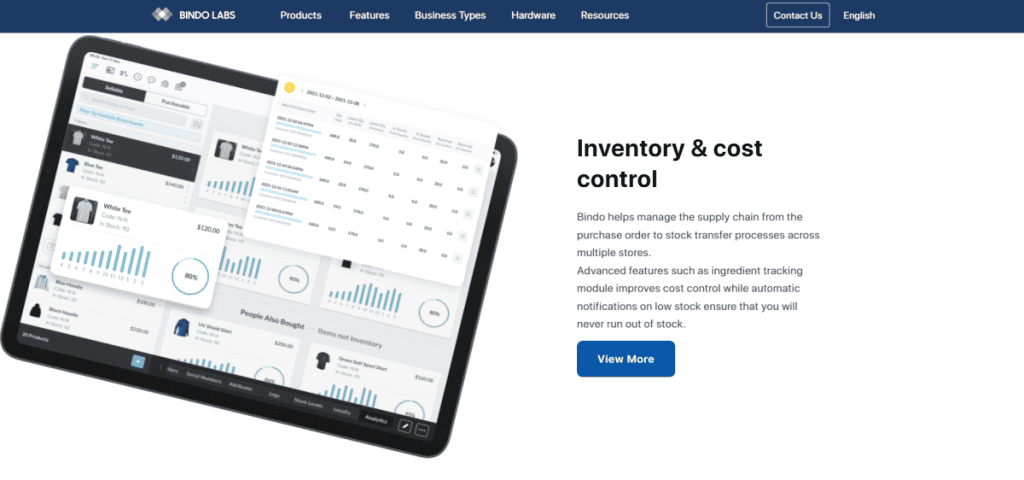
Bindo POS excels in inventory management, offering the capability to store data for up to 10 million products. This system has advanced capabilities such as alerting for low stock and generating purchase orders, aiding businesses in keeping their stock levels optimal. Smart re-arrangement recommendations enhance inventory control, guaranteeing constant availability of in-demand products. For restaurants, Bindo includes ingredient tracking, which simplifies kitchen operations. The multi-location management feature allows businesses to manage inventory across multiple stores seamlessly, facilitating easy transfers and consolidated tracking.

Customer Relationship Management (CRM)

Bindo’s CRM capabilities enable businesses to create detailed customer profiles and track purchase histories. This data can be leveraged to design personalized marketing campaigns, enhancing customer engagement and loyalty. Businesses can utilize the integrated loyalty programs and strong promotion tools to provide tailored rewards, discounts, and special promotions, leading to increased customer satisfaction and repeat business.

Employee Management

The employee management tools in Bindo POS include PIN-based time clocks, enabling employees to clock in and out digitally. While the system offers basic performance reporting, it lacks advanced payroll and scheduling features, which might be a limitation for larger businesses requiring comprehensive employee management solutions.

Reporting and Analytics

Bindo provides a variety of reporting and analytics tools that deliver insights into sales, inventory, and employee performance. Businesses can generate sales summaries, track inventory levels, and monitor employee performance metrics. The system provides the option to customize reports and visualize data, enabling businesses to adapt analytics to their unique requirements. These characteristics assist in forming well-informed decisions using current data.

Bindo POS is known for its wide range of features and strong capabilities, making it a valuable asset for businesses aiming to improve efficiency and customer satisfaction.

Hardware Options

Bindo POS provides a variety of hardware options to suit various business requirements. Businesses can personalize their POS setup to improve efficiency and customer service by using a variety of devices and third-party accessories that are compatible.

Compatibility with Existing iPads: One of the primary advantages of Bindo POS is its compatibility with existing iPads. This feature allows businesses to leverage their current hardware, reducing the need for significant additional investments. Installing the Bindo POS app on an iPad can quickly turn it into a robust point-of-sale terminal. This compatibility guarantees a smooth and cost-efficient integration with current business operations.

Support for Third-Party Hardware: Bindo POS supports a wide range of third-party hardware, enhancing its functionality and flexibility. Businesses can integrate barcode scanners, receipt printers, and cash drawers from various manufacturers, including well-known brands like Pax and Landi. This assistance enables companies to select the hardware that aligns with their operational requirements and financial constraints. Barcode scanners make the checkout process more efficient by rapidly and precisely scanning product details. Receipt printers ensure customers receive printed records of their transactions, while cash drawers provide secure storage for cash transactions.

Mobile POS Solutions and Self-Service Kiosks: Aside from conventional POS systems, Bindo provides modern business needs with mobile POS solutions and self-service kiosks. Mobile POS solutions enable businesses to take the checkout process directly to the customer, whether at tableside in a restaurant or within a retail store. This mobility enhances customer service and speeds up transactions, leading to higher customer satisfaction. Bindo POS supports self-service kiosks as an additional innovative feature. These kiosks enable customers to place orders and process payments independently without the need for staff assistance.This option is particularly beneficial in high-traffic environments like quick-service restaurants or retail stores, reducing wait times and improving overall efficiency.

Bindo POS is a versatile option for businesses looking to improve their operational efficiency and customer experience, thanks to its wide range of hardware compatibility and support for mobile and self-service solutions.

Pricing

When it comes to pricing, Bindo POS is difficult for potential customers because it does not provide clear pricing information. Unlike many other POS systems that offer clear pricing structures on their websites, Bindo requires businesses to contact their sales team for a custom quote. This approach can be frustrating for businesses looking to quickly compare costs and determine the best fit for their budget.

Lack of Transparent Pricing Information: Bindo does not publicly disclose its pricing details on its website. This absence of transparent pricing means that potential customers cannot readily see what they might expect to pay for the service. Businesses must go through the process of contacting the sales team, which can be time-consuming and may deter some potential clients who prefer upfront clarity on costs.

Custom Quotes from the Sales Team: Businesses need to contact Bindo’s sales team to get pricing information. The sales team offers personalized quotes depending on the specific requirements and scale of the company. Even though this method enables Bindo to customize its pricing to suit specific business needs, it also results in significant price discrepancies among customers.

Availability of a 14-Day Free Trial: Despite the lack of transparent pricing, Bindo does offer a 14-day free trial. This trial period allows businesses to explore the system’s features and functionalities before making a financial commitment. The trial allows for evaluation of whether Bindo POS meets their operational requirements and warrants the investment. This can be especially beneficial for companies that are uncertain about switching to a different POS system.

In summary, while Bindo POS offers a flexible and potentially cost-effective solution tailored to individual business needs, the lack of transparent pricing information can be a drawback. However, the availability of a 14-day free trial provides a risk-free way for businesses to evaluate the system’s suitability for their operations.

Contract Terms

Businesses must grasp the contract terms of Bindo POS to make an informed decision about adopting it. Bindo provides options in its agreements, however, it is important to understand certain crucial factors such as contract demands, length, cancellation rules, and extension conditions.

Overview of Contract Requirements: Bindo POS typically requires businesses to enter into a formal agreement outlining the scope of services, pricing, and specific requirements tailored to the business’s needs. These contracts are designed to ensure that both parties clearly understand their obligations and the services to be provided. The agreements often include details on the hardware and software components, training, and support services.

Duration of Contracts: The duration of contracts with Bindo POS can vary depending on the specific agreement reached with the sales team. Businesses may have the option to choose between short-term and long-term contracts. Short-term agreements offer businesses flexibility if they are unsure of their long-term requirements or wish to assess the system before fully committing. Long-term contracts, on the other hand, may offer better pricing and stability, making them suitable for businesses looking for a long-term solution.

Termination Policies: Termination policies are an essential part of any contract, and Bindo POS contracts typically include clauses detailing the conditions under which either party can terminate the agreement. These factors could consist of not upholding the contract, not achieving agreed upon performance measures, or other important problems. Businesses must carefully examine these policies in order to comprehend the potential consequences or charges connected to ending the agreement prematurely. Generally, proper notice must be given, and specific procedures followed to terminate the contract without incurring additional costs.

Renewal Terms and Conditions: Renewal terms for Bindo POS contracts are usually outlined in the original agreement. Contracts may automatically renew at the end of the term unless either party gives notice of their intent not to renew. The renewal terms can also include adjustments in pricing or service levels, reflecting changes in the business environment or the specific needs of the business. It is advisable for businesses to review these terms closely and discuss any desired changes with Bindo’s sales team before the renewal date.

Bindo Review

Ease of Use

Bindo POS is designed with user-friendliness in mind, offering an intuitive interface that simplifies daily operations for businesses. This ease of use extends from its initial setup to everyday navigation, making it accessible even for those who may not be tech-savvy.

User-Friendly Interface and Navigation: The Bindo POS interface is clean and straightforward, allowing users to easily navigate through its various functions. The system is designed to minimize the learning curve, enabling staff to quickly become proficient in its use. The main dashboard provides clear access to essential functions such as sales, inventory management, and customer data, ensuring that users can perform tasks efficiently without having to wade through complex menus.

Customizable POS Interface for Different Industries: One of the standout features of Bindo POS is its ability to customize the interface to suit different industries. Whether you’re running a retail store, a restaurant, or a service-based business, Bindo allows you to tailor the POS system to meet your specific operational needs. This customization includes adjusting the layout, modifying transaction workflows, and integrating industry-specific tools such as table management for restaurants or appointment scheduling for salons. This flexibility ensures that businesses can optimize their use of the POS system to enhance their operational efficiency.

Initial Setup and Onboarding Experience: The initial setup of Bindo POS is designed to be as seamless as possible. Once a business decides to implement Bindo, the setup process involves installing the software on compatible devices, such as iPads, and configuring it to match the business’s specific needs. Bindo’s customer support team is available to assist with this setup, providing guidance and support to ensure everything is configured correctly. Additionally, the onboarding experience includes training sessions for staff to familiarize them with the system. This comprehensive support helps businesses get up and running quickly, reducing downtime and ensuring a smooth transition to the new POS system.

Customer Support

Bindo POS offers several customer support options to help businesses resolve issues and make the most of their system. However, some limitations in their support channels may affect the overall user experience.

Email and Phone Support Availability: Bindo provides email and phone support to assist customers with any questions or technical issues they might encounter. Email support allows users to detail their problems and receive comprehensive responses, often within a reasonable timeframe. Phone support is available during business hours, offering direct and immediate assistance. This is particularly beneficial for urgent issues that require quick resolutions. The availability of these support channels ensures that users have access to help when they need it, contributing to a more seamless user experience.

Removal of Live Chat Option: One significant drawback in Bindo’s customer support is the removal of the live chat option. Live chat previously offered real-time assistance, making it a convenient and efficient way for users to get help. The absence of this feature means users now have to rely solely on email and phone support, which may not always provide the immediacy that live chat did. This change can be particularly inconvenient for businesses that operate outside of regular business hours or those that need instant support.

Knowledge Base and Tutorial Resources: To compensate for the removal of live chat, Bindo has a comprehensive knowledge base and a range of tutorial resources. The knowledge base includes detailed articles, FAQs, and step-by-step guides that cover various aspects of the POS system. These tools aim to assist individuals in resolving typical problems on their own and mastering the system’s functions efficiently. You can access tutorial videos for visual instructions on how to set up and utilize various features of Bindo POS. This self-help approach empowers users to resolve issues on their own and gain a deeper understanding of the system.

Security

Security is a critical aspect of any point-of-sale (POS) system, as it handles sensitive customer information and financial transactions. Unfortunately, Bindo POS has raised some concerns due to the lack of detailed security information available to its users.

Concerns Over Lack of Detailed Security Information: One of the primary issues with Bindo POS is the insufficient transparency regarding its security measures. Although the system provides military-level encryption for transaction security, there is little detail available regarding other security measures like protocols, certifications, or adherence to industry standards like PCI DSS. The absence of specific information may cause potential users to feel uneasy, as they cannot thoroughly evaluate the system’s ability to safeguard sensitive data. Businesses need comprehensive security details to ensure their POS system will safeguard against data breaches and cyber threats.

Importance of Security in POS Systems: The importance of security in POS systems cannot be overstated. POS systems handle a significant volume of transactions and store sensitive information such as credit card details and customer data. A breach in security can result in significant financial losses, harm to reputation, and legal consequences. Hence, it is crucial for a POS system to utilize strong encryption and implement thorough security measures.

Secure POS systems should include features such as:

Data Encryption: Ensuring that all transaction data is encrypted both in transit and at rest.

Access Controls: Implementing strict access controls to limit who can access sensitive information and system settings.

Regular Security Updates: Providing regular software updates to address vulnerabilities and enhance security features.

Compliance with Standards: Adhering to industry standards like PCI DSS to ensure comprehensive security practices.

Businesses must be confident that their POS system can protect against data theft and cyber attacks. As such, they typically prefer systems that provide clear, detailed information about their security measures and certifications. For Bindo POS to reassure its users, it would benefit from increased transparency and detailed disclosure of its security protocols and compliance certifications.

Overall, Bindo POS states that it utilizes advanced encryption methods to secure transactions, but the absence of specific security details could worry prospective customers. Due to the crucial significance of security in POS systems, Bindo should strive to offer more detailed information to instill confidence and reassure its users about the protection of their data.

Pros and Cons

Pros

Versatile and feature-rich: Bindo POS offers a wide range of features that cater to different business needs, making it a versatile solution for various industries.

Comprehensive CRM and inventory management: The system includes robust customer relationship management and inventory management capabilities, allowing businesses to efficiently track customer interactions and manage stock levels.

User-friendly interface: Bindo POS is designed with an intuitive and easy-to-navigate interface, minimizing the learning curve for new users and enhancing overall user experience.

Cons

Lack of transparent pricing: Bindo POS does not provide clear pricing information upfront, requiring potential customers to contact the sales team for custom quotes. This can be frustrating for businesses looking for straightforward pricing details.

Limited employee management features: The system lacks advanced employee management tools, such as comprehensive payroll and scheduling functionalities, which may be necessary for larger businesses.

Insufficient security information: While Bindo POS claims to use high-level encryption, there is a lack of detailed information about other security measures and protocols, potentially causing concerns for businesses prioritizing data security.

Bindo Review

Alternatives to Bindo POS

For businesses seeking alternatives to Bindo POS, several other options offer robust features and capabilities.

Square POS

Overview and Key Features: Square POS is a popular choice for small to medium-sized businesses due to its comprehensive features and ease of use. It offers integrated payment processing, inventory management, and customer relationship management. Square POS also supports various payment methods, including credit cards, mobile payments, and contactless transactions. The system provides valuable reporting and analytics tools, and its hardware options include mobile card readers and full-service countertop registers.

Clover POS

Overview and Key Features: Clover POS is known for its flexibility and extensive hardware options. Its selection includes various POS terminals, such as mobile options like Clover Go and full-service options like Clover Station. Noteworthy features comprise customizable software, strong inventory management, staff management, and customer loyalty programs. Clover POS also integrates with numerous third-party applications, enhancing its functionality and allowing businesses to tailor the system to their specific needs.

Shopify POS

Overview and Key Features: Shopify POS is ideal for businesses with a significant online presence. It integrates seamlessly with the Shopify e-commerce platform, enabling unified management of both online and offline sales. Important aspects include thorough inventory control, client information, and extensive reporting. Shopify POS provides support for multiple payment methods and offers a range of adaptable hardware choices, such as card readers and retail kits. Its extensive app ecosystem allows businesses to add functionalities tailored to their specific requirements.

These alternatives provide diverse options, each with unique strengths, making them suitable for different business needs and environments.

Conclusion

Bindo POS provides a flexible and full-featured system with extensive CRM and inventory control, along with a user-friendly interface. Nevertheless, it comes with drawbacks such as unclear pricing, minimal employee management options, and inadequate security information. Potential users need to carefully consider these advantages and disadvantages before making a decision.